
DeCodEx
Please let our ADS show!
This sites offers only FREE software and it's supported by a few advertisement boxes (no intrusive popups).
Please:
- disable your AdBlocker by adding CoolSoft website to whitelist
- give the proper cookie consent
- enable JavaScript for this website
This seconds wait is to let you update your browser configuration...
Ok, I've done the required changes... now show me your content!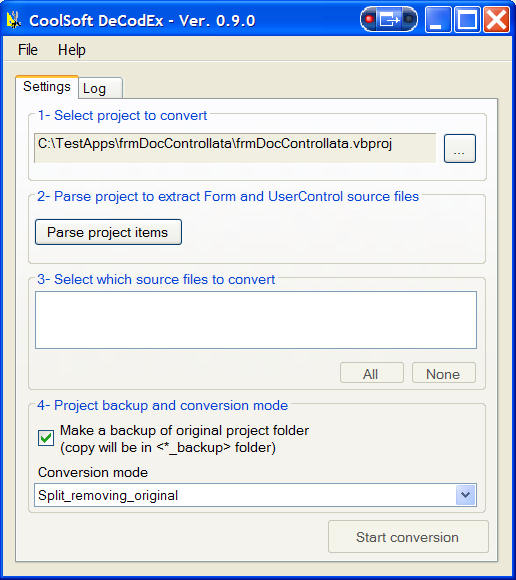
 DeCodEx stands for Designer Code Extractor.
If you are using the new .NET Framework 2.0, I hope you know about the existance of Partial Types.
Partial types allows you to split the definition and implementation of a class or a struct across multiple files.
You can put one part of a class in one file and another part of the class in a different file by using the new partial keyword
VisualStudio 2005/2008/2010/... itself uses partial types to manage Form and UserControl sources, separing Designer code from User code.
This is a better solution, if compared with the old #Region...#End Region used in VisualStudio 2002/2003.
OK, we all agree on this but... have you ever tried to convert a .NET 1.1 project to 2.0?
The conversion usually completes smootly, depending on how well was the old code written (VS2005 is more meticolous regarding type-conversions and Object usage).
Anyway, during the conversion, Forms and UserControls are not splitted to the new (so called) Designer+User format.
Since I was tired having all of my user code mixed with VisualStudio one, I created DeCodEx to split an old-style source file into User+Designer partial files.
Splitting is accomplished by moving regions, fields and methods from the original Form1.vb (or .cs) to the new Form1.Designer.vb (.cs) file.
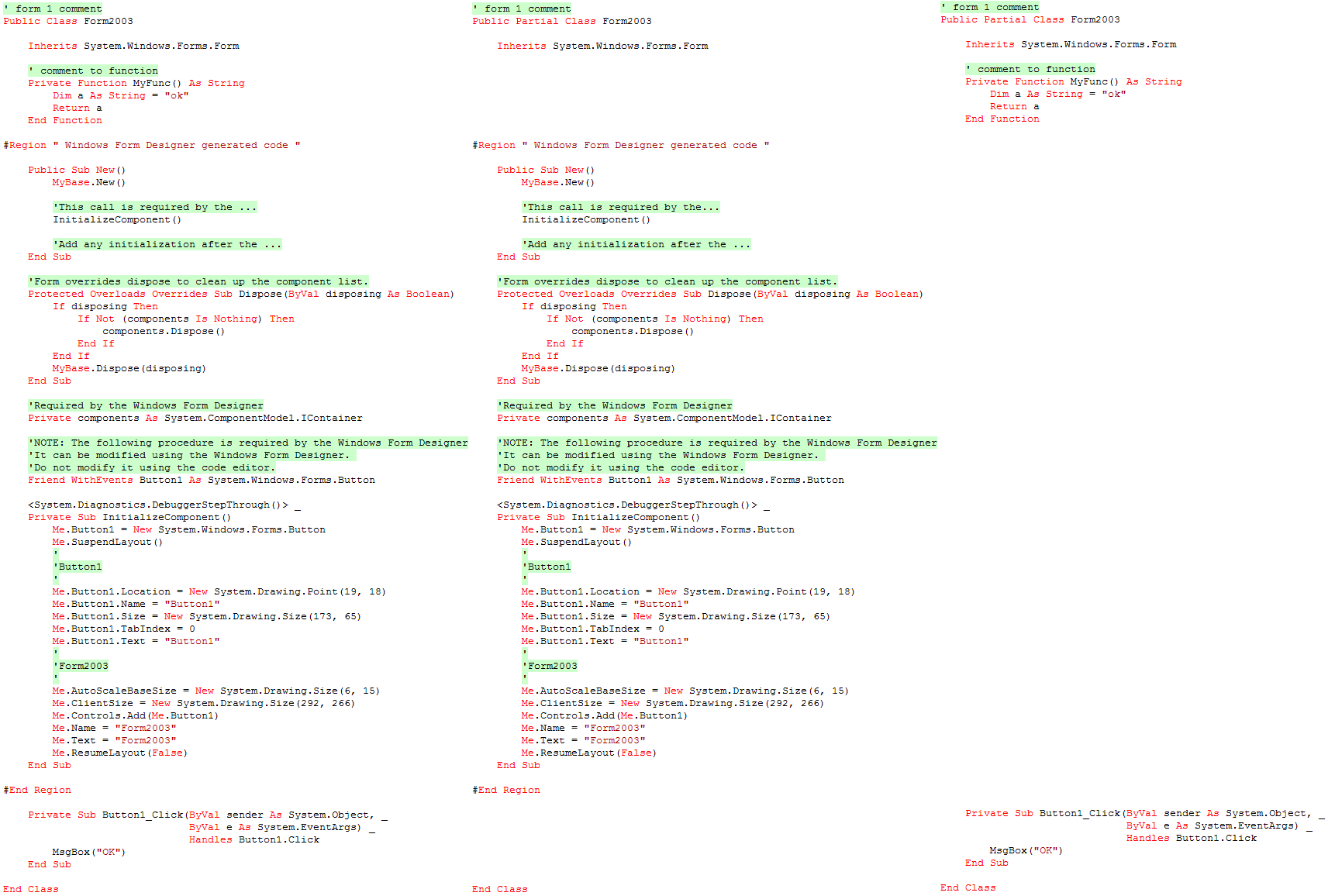
Moved blocks can be even left commented in the original file (see picture below).
Features
- given a project file, you can select which Forms / UserControls will be converted
- source code is parsed with a compiler-like parser; no Regular Expressions are used to ensure better results
- VB.NET and C# sources are fully supported
- C# fields were declared outside the #region; DeCodEx parses those fields type and moves only the ones derived from Control or Component
- splitting is done in a safe way, no lines were dropped: each original line will appear in Designer or in User file
- you can set force DeCodEx to leave the orinigal lines as commented in the original source file; a special line comment prefix will be added, allowing you to remove these lines afterward
- could create a backup of your project before starting conversion
- detailed activity log and error management
- can be run outside VisualStudio
Here you can see the result after the splitting (click to see the full image):
ver. 1.2.0 - (10 Apr 2017)
- NEW: Added support to UTF8 encoded source files.
- FIX: InitializeComponent() method is not moved in C# source files under certain conditions.
ver. 1.1.0 - (22 Feb 2012)
- NEW: Added support for VS2010 projects. NEW: Added support for multiple classes into the same source file.
ver. 1.0.0 - (12 Jan 2009)
- FIX:Attributes applied to class level are not duplicated in .designer file anymore. They will appear in user file only (thanks to Steve Schoon).
ver. 0.9.7 - (18 Oct 2008)
- NEW: While adding project items, DeCodEx tests if file is missing, readonly or the corresponding .designer file already exists; if one of these conditions is true, the item can't be selected and drawn in red. This could help if your sources are coming from SourceSafe (thanks to Paul).
- NEW: Main dialog now saves its size and position.
ver. 0.9.6 - (21 May 2008)
- FIX: Fixed a bug reading source files which contain extended ASCII chars, like German umlaute (üöä...) which causes this chars to be replaced by squares (thanks to Petra).
ver. 0.9.5 - (21 Apr 2008)
- User can now add his own "Windows Form Designer" region names, if its locale is not (still) supported.
They are loaded from two files (inside bin folder):
- RegionNames.txt contains "official" localizations and is mantained by CoolSoft; it'll be updated at each new version of DeCodEx; DO NOT EDIT THIS FILE.
- RegionNames.user.txt contains user customized names and won't be touched by setup procedure.
Again, please send me your localized names and I'll add them to official ones.
ver. 0.9.4 - (14 Apr 2008)
- NEW: "Windows Form Designer" region name is localized (still wondering why >:-) ).
DeCodEx now recognizes this name (and the corresponding UserControl one) in localized version of VisualStudio; currently supported locales are:
ENG: "Windows Form Designer generated code"
ITA: "Codice generato da Progettazione Windows Form" (thanks to Paolo)
Send me region names of your unsupported locale... - NEW: Log only supported project items (Forms and UserControls).
- NEW: Log all movable-types (types that DeCodEx will move to Designer file).
- FIX: C# form (and user control) constructors are wrongly moved to *.Designer.cs file (thanks to Michael).
ver. 0.9.3 - (28 Feb 2008)
- NEW: In case of code parsing errors, they are reported into log for further investigation ver. 0.9.2 - (28 Feb 2008)
- NEW: Argument exception in frmMain.vb:line 83 while parsing project (reported by Dan Sifuentes)
ver. 0.9.1 - (27 Feb 2008)
- NEW: Menu item to check for new version
- FIX: Some cosmetic fixes to GUI
ver. 0.9.0 - (01 Feb 2008)
- First public release
Download
Mirroring, repackaging and any other way to redistribute my software to end users from outside coolsoft.altervista.org is FORBIDDEN! (unless expressly authorized)
Links to this page are welcome (do not use HTML #fragments and do not link the .exe file directly).
| DeCodEx_setup_1.2.0.exe | |||
| Descrizione | Stable version | ||
| Release date | 2017-Apr-10 | Dimensione | 469,008 bytes |
| MD5 | 525cc02fece57d4086cca6a429343a15 | ||
| SHA1 | 80dd59d92aeec72eb6bafe3898d6c31c05ca682c | ||
| SHA256 | df0c3e692b7e6f0ba96adeb433bf6cc8f2a49ec1bfaad497b7766dc9dc45a1a9 | ||
| Open virus check report | |||
 English
 Italiano
Login
Clicca qui per supportare il mio lavoro con PayPal
oppure offrimi un caffè
Commenti
Found a Bug
This software is great and has been very helpfull to me. One problem that I stumbled across is that when you have an additional class declared in your form, the designer code has:
Partial Class formClass
    Inherits formBaseClass
End Class
Partial Class secondClassInForm
...
So all of the designer generated code is in the second sub class. The sub class code is also still in the original Form Page so it is repeated twice, so to fix this you only have to delete it in the designer. Not a big issue considering how much time this saves us but I thought you might like to know.
I had backups turned off and had it set to remove code (not comment it out).
Cheers,
Poohshoes
VS 2010
Thank you for this nice prog.
One thing I have found: If you convert a VS10 project and a form uses feature > framework 2.0 like linq the form would not converted. Any chance to get this corrected?
Thank you
Wolfgang
Nice to see that my tool is
Nice to see that my tool is still used... ;)
Please send me a minimal project (with just one form) that shows the issue and I'll take a look.
please update the tool to understand new C# syntax
thank you for the wonderful tool; however it is not identifing the latest syntax of c#, like default value in the function declaration
ERROR: Error parsing item: Abc.cs, 1 error(s) found
-- line 1col 38: ")" expected
i tried to run the application by replacing the old NRefactory library with new 5.5 version, however it failed to load the assembly
System.BadImageFormatException: Could not load file or assembly 'ICSharpCode.NRefactory, Version=2.2.1.2807, Culture=neutral, PublicKeyToken=efe927acf176eea2' or one of its dependencies. This assembly is built by a runtime newer than the currently loaded runtime and cannot be loaded.
please release a updated version of tool. if you don't mind think about make the project an opensouce by publishing it on codeplex or github
Adding support to latest
Adding support to latest NRefactory lib will change CLR requirement to change from 2.0 to 4.0.
This tool was written with Framework 1.1 in mind, where .designer files were not available.
Target users are VisualStudio 2002, 2003, 2005, 2008 developers...
I've never thought that such up-to-date code (with C# brand new language features, like the sample you provided) still exists in a single-file format.
Anyway, there are some things stopping me from updating to the latest NRefactory release:
This is not a real issue, but VisualStudio 2002, 2003, 2005, 2008 couldn't have it or don't like to install it on their development machines.
This is not acceptable, because a lot of old code (from Framework 1.1) was written with this language.
Maybe the better solution is keeping both version: the current one (supporting old style VB.NET and C#) and a new one (supporting new C# features and requiring Framework 4.0).
Will check it out...
Any update on .NET Framework
Any update on .NET Framework 4.0 support with latest NRefactory
The new VS2015 .NET compiler
The new VS2015 .NET compiler (Roslyn) is very interesting, because it exposes all of the parser classes needed to extract/edit/move code around.
Will have a look on it, but it will surely require some time...
New version
Hi!
Any progress on support VS2015 and Framework 4+?
I have 2 real large projects tu conververt with more then 150 forms each.
Happy conding
Wolfgang
Sadly supporting newer
Sadly supporting newer VisualStudio requires a huge lot of work because:
So the only viable option now is to build a VS2015 add-in and rely on the built-in Roslyn (.NET compiler) parser.
But this could be a long task with a very small user-base... sadly :(
These two links contains some interesting things, but I suppose you've already seen them:
http://blog.dotsmart.net/2008/05/20/converting-visual-studio-2003-winfor...
http://www.codeproject.com/Articles/528990/A-Visual-Studio-add-in-to-mov...
Nice tool
Great tool, many thanks! Just converted 2 large legacy vb.net projects with no issue.
Thank you for reporting your
Thank you for reporting your success here.
I'm glad this tool is still useful after such a long time ;)
Bug in latest version
I downloaded the latest version and found that it doesn't move the InitilizeComponent to the designer file.
I looked inside your excutable with reflector and found the offending code:
Can you please confirm and correct.
Thanks in advance.
Ouch my fault, bad copy/paste
Ouch my fault, bad copy/paste.
Those should have been 3 very similar pieces of code: parser.get something, test if not null, code move.
The second one was pasted but not edited...
The if statement, just after declaration4, should read:
declaration4 was named like that by Reflector because its was not used anywhere in the next lines.
I've just published version 1.2.0-beta1, please test it and report if it works.
Thanks for your feedback ;)
Problem Solved
Thanks for your quick response, this problem is solved. The InitilizeComponent() method is moved to the designer file.
I noticed another hickup! I have some unicode text in some of the files and it was replaced by "?????" in the output files.
My guess is that you open the files for reading and writing with encoding different from unicode. Can you fix that since VS files are unicode anyway.
Also, as mentioned in the comments already, 9 of 80 files were not converted because they had "newer constructs" such as object initializers.
Thanks for your time and effort.
Live long and prosper.
1.2.0-beta2 now preserves
1.2.0-beta2 now preserves encoding between original and splitted files.
Please let me know if it works so I can publish 1.2.0 final version.
As for the new language features issue, its something that will require a lot of work: the language parser component (from ICSharpCode) has changed a lot meanwhile and, most important, it won't support .NET 2.0 anymore.
Since single-source files concept came from the .NET 1.1 ages, DeCodEx was supposed to be used to split those legacy sources (without those new features in).
That's why I decided (a long time ago) to skip upgrade...
It still amazes me how such an old tool (first version of DeCodEx is dated 2008) is still useful to a lot of people ;)
OK, I can confirm that
OK, I can confirm that Encoding is preserved.
Thank you for your kind attention.
Thanks for your feedback.
Thanks for your feedback.
Just released version 1.2.0.
Error in conversion when one line of code = multiple lines
Hi,
There is an issue with the conversion, when one line of code is split on multiple lines, but without the underscore at the end of the line.
This is new in VS2015, we don't need to put an underscore at the end of the line when it's split in multiple lines.
Example:
This line will convert without any errors:
MessageBox.Show("This will convert" & _
" without any error.")
But this won't be converted:
MessageBox.Show("This will convert" &
" without any error.")
Any chances your tool can be updated to take care of this new code formatting?
Thank you very much!
Well, DeCodEx is a 10 years
Well, DeCodEx is a 10 years old project, created to update VS2002/2003 projects to the new 2005 partial classes layout.
Its parser is a now old version of ICSharpCode.NRefactory.dll, which was never updated in years.
I honestly don't know if there's an updated version that supports the new syntax but, if I'd start the project now, I'll go the Roslyn way... now .NET compiler is open sourced and it features a state-of-the-art parser and code DOM tree.
That's an huge work, because we need to restart from scratch and, honestly speaking, I can't actually afford such a huge work... sorry ;)
Doesn't work with encoding Windows-1252
The conversion doesn't work with encoding Windows-1252.
Is there a way to solve this?
You should try to convert
You should try to convert your source files to utf-8 first.
If you don't have a tool that can convert files in batch mode, have a look here for some ideas: https://superuser.com/questions/27060/batch-convert-encoding-in-files
I will try, Thanks! ;)
I will try, Thanks! ;)
Forever asking me to find DLL dependencies
Thanks for taking time to make this awesome utility so many years ago that continues to help some of us.
I have a large project I'm trying to use this on and it is constantly asking me to try to locate DLL dependencies for it when I click the "parse" button.
(I've located hundreds of files including the same ones over and over but I can never get through the list).
Is it possible to specify a folder for it to search for the DLL dependencies?
Any chance you might consider open sourcing this tool?
I'm amazed to know that this
I'm amazed to know that this tool is still used... it just has come of age (first build was in 2005 😮).
Last update was in 2017, and I honestly don't remember how it works 😂.
> Any chance you might consider open sourcing this tool?
I will, for sure, because I'm not actually able to manage it.
It's a VB.NET project (sorry!), and I ever wanted to convert it to C#, but I never had the time.
I only need to clean it up a bit, cleanup comments and translate (most of) them to english.
It started as a private project, and being younger and stupid at that time, I can only wonder what I could find it them...