
H264/AVC Level Editor
Please let our ADS show!
This sites offers only FREE software and it's supported by a few advertisement boxes (no intrusive popups).
Please:
- disable your AdBlocker by adding CoolSoft website to whitelist
- give the proper cookie consent
- enable JavaScript for this website
This seconds wait is to let you update your browser configuration...
Ok, I've done the required changes... now show me your content!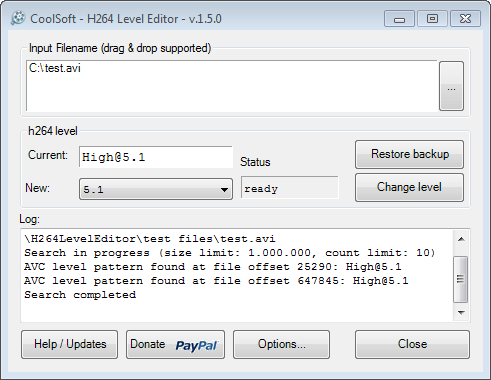 H264LevelEditor is a free and small tool to edit an H264/AVC encoded video stream and change IDC profile level (see here for detailed info about IDC levels).
Works both on MKV containers and raw H264 streams (*.h264, *.264, *.ts or any other file containing H264 encoded video).
It's a portable software, no need to install it, and comes in two flavours:
- Graphical (GUI):
Use it if you need to edit a single or few files. - Command line (CLI):
It has the same features of the graphical version and can also work on multiple files.
You could also include it into your custom conversion scripts.
Quick intro
Video stream/file is edited in-place, which means:
- fast editing
- no need to reencode the file (save time)
- no need to demux, edit and remux streams (save time and HDD space)
To make a long story short, some mediaplayers (like my Samsung C6000 LED TV and Sony PS3) search the video file being played for an header info named AVC profile level; if this level is greater than the requested (supported) one they simply refuse to play it, even if they could.
BluRay specifications requires level 4.1, which is supported by all actual HD mediaplayers. Many of the video files you'll find on internet were encoded with an unnecessary high level, like 5.1.
The right way to change AVC level is to reencode the file; this is really time consuming, even if you have a recent CPU.
A quick way is to change some bytes inside the file and make it appear as being encoded with a different level; if you're lucky, changing that 5.1 to 4.1 will make the file playable on your mediaplayer.
Just to be clear: H264LevelEditor does not change video stream compression.
It only changes a value in file header, where it "declares" its level to the world.
Many of the 5.1 encoded files out there are not really 5.1, but over-leveled 4.0 or 4.1.
If the file itself is encoded using 5.1-only features, and your player is not able to decode it, well... you must reencode it, no way.
Usage help (graphical version)
Using H264LevelEditor is easy as 1-2-3:
- select the video file to edit by pressing then tree-dots button, or drag&drop the file directly from Windows Explorer
- H264LevelEditor will show actual AVC level into the "h264 level" box, choose the new level you want to set
- press "Change level" button
- click on "Donate" button (well, this is obviously optional ;) )
User BlackMIIX published a good video tutorial here, take a look.
Usage help (command line version)
Command line version can be used to edit a single file or a group of files in a shot.
Can also be called by .bat or .vbs custom scripts.
This will change level of file C:\MyFiles\test.avi to 4.1:
> H264LevelEditorCli.exe --action change --input "C:\MyFiles\test.avi" --new-level 4.1
This will change level of all file*.avi files into folder C:\MyFiles (file001.avi, file002.avi, fileabc.avi, ...) to 4.1:
> H264LevelEditorCli.exe --action change --input "C:\MyFiles\file*.avi" --new-level 4.1
See the included file H264LevelEditorCli.txt for more options, samples and exit codes.
v.1.5.3 - 2017-04-28
- FIX: CLI parameter "--new-level" is not required if action is "restore".
v.1.5.2 - 2014-07-17
- NEW: Added *.avc to the list of supported file extensions.
v.1.5.1 - 2014-04-22
- NEW: Initial support for Mono Framework. The application should now run on Linux and Mac OSX through the Mono framework.
v.1.5.0 - 2014-01-29
- NEW: Added an option to preserve last modified date of the file being patched. The option is available in both GUI and CLI versions.
- FIX: Runtime error when closing the GUI while search is running.
v.1.4.0 - 2013-08-29
- NEW: Command line version of H264LevelEditor is now available (H264LevelEditorCli.exe).
It has the same patching engine of the GUI version and can also work on multiple files.
v.1.3.0 - 2013-08-16
- NEW: Search task now runs in a separate thread.
This will keep the UI alive during long searches. - FIX: Readonly files caused a runtime error when pressing the "change level" button.
This state is now detected and user is asked to clear the flag before level change starts (thanks to Biomech for the suggestion).
v.1.2.0 - 2012-01-24
- NEW: Search limit can now be extended up to first 100MB of the file (default is 1MB). This adds better support for MP4 files.
- NEW: initial (and really experimental) support for H264 encoded AVI files. Please remember that AVI is not a good container for H264/AVC stream.
- NEW: added automatic software update checking feature, can be set into Options dialog
- FIX: fixed search algorithm to avoid @n.k profiles detection
please see comments here for further details:
http://coolsoft.altervista.org/comment/363#comment-363
v.1.1.0 - 2011-08-05
- NEW: backup feature, allows to undo any changes to input file
- NEW: improved search algorithm, now changes the muxing tag too
- NEW: fix to recognize mislabeled profiles, such the ones produced with very old encoders
Download
H264LevelEditor it's a portable software (single EXE), no need to install it.
WARNING: .NET Framework 2.0 or newer is required: 2.0 (x86) - 2.0 (x64) - 4.0 (client profile)
(Windows Vista comes with .NET Framework 3.0 preinstalled, Windows 7 comes with .NET Framework 3.5 preinstalled.)
| H264LevelEditor_1.5.3.zip | |||
| Descrizione | Latest version, includes both GUI and CLI | ||
| Release date | 2017-Apr-28 | Dimensione | 256,566 bytes |
| MD5 | 3ae92b7b79df9a3acbff8bdcb699bb5b | ||
| SHA1 | ac5af720ee64b0babf1ec44af4272dbf5d26c8e4 | ||
| SHA256 | a087600d0265da5481c3e480542e8f05eb06b1dfcf284921cdd7a79424ae4797 | ||
| Open virus check report | |||
| H264LevelEditor_1.5.2.zip | |||
| Descrizione | Previous version | ||
| Release date | 2014-Lug-17 | Dimensione | 264,834 bytes |
| MD5 | d9998f523f0ee21de338da472f8610a1 | ||
| SHA1 | 1d4b0fa4cfa48195b61a8d0ce248b1ef85c1fe02 | ||
| SHA256 | 32fbf98a6f7811c3a42a9aa25237f9fd272acc04c484089ec6e39b3f800d267f | ||
| Open virus check report | |||
 English
 Italiano
Login
Clicca qui per supportare il mio lavoro con PayPal
oppure offrimi un caffè
Commenti
Pagine
ERROR
Salve ho provato ad utilizzare questo programma, ma con alcuni file mi da il seguente errore...
ERROR: Can't find any AVC profile!
ERROR: You can try to increase search limits.
cosa posso fare?
grazie
Premi il pulsante "Options"
Premi il pulsante "Options" ed aumenta i imiti di ricerca, sia quello in MByte che quello numerico.
Se non ottieni risultato allora il file non può essere editato ma deve essere ricodificato per intero.
--action restore
First of all, thank you for this handy tool.
A lot of my media with profile level 4.1 cannot be succesfully modified so now I am trying to revert the changes with the backup files.
Nevertheles, when I try, I get this error:
H264LevelEditorCli.exe --action restore --input "clip.mp4"
CoolSoft H264LevelEditor 1.5.2 - Command line version
ERROR: The required parameter --new-level is missing
The .hle-bak is present. Any hint as to how to fix this please?
I am using the CLI because I have lots of files and I want to process them in bulk using the command: FOR /r %%i in (*.mp4) DO H264LevelEditorCli.exe --action restore --input "%%~fi"
Thank you.
That parameter is not used at
That parameter is not used at all with --action restore.
I've released an updated version (1.5.3) that fixes the bug.
Thanks for pointing it out.
Ciao, grazie per questo tool
Ciao, grazie per questo tool che mi è stato utile diverse volte. Ora però mi sarebbe molto utile lo stesso tool per HEVC h265...pensi di poter estendere la compatibilità a tale codec? Grazie.
H265 non lo conosco bene e
H265 non lo conosco bene e non credo di poterci dedicare del tempo...
Sorry ;)
Error
Hello. I am trying t change the H264 level of a mkv file. All I get is
"Search in progress (size limit: 1.000.000, count limit: 2)
AVC level pattern found at file offset 277330: [email protected]
AVC level pattern found at file offset 310118: [email protected]
Search completed
ERROR: Warning: different levels found, you can try to decrease 'Found patterns' limit."
The file is encoded with [email protected], according MediaInfo report. So I'm guessing this app is failing. I've tried with some other files with the same encoding level. No luck though!
If the file is @5.2 there's
If the file is @5.2 there's no chance it's an "over-encoded" 4.0/4.1.
Quoted from Quick intro:
> Just to be clear: H264LevelEditor does not change video stream compression.
> It only changes a value in file header, where it "declares" its level to the world.
> Many of the 5.1 encoded files out there are not really 5.1, but over-leveled 4.0 or 4.1.
> If the file itself is encoded using 5.1-only features, and your player is not able to decode it, well... you must reencode it, no way.
Sorry, you must reencode it...
Ability to set "Main-compatible" flag?
A lot of Baseline encoded files on the internet seem to be missing the Main-compatible encoding flag, which makes DXVA 2.0 to not try to decode the files, since it only supports Main-compatible h.264 streams. According to https://msdn.microsoft.com/en-us/library/windows/desktop/dd797815(v=vs.85).aspx "Main-compatible Baseline bitstreams are defined as profile_idc=66 and constrained_set1_flag=1."
Can you allow the option to override these flags so that DXVA will try to decode them anyway?
Most smartphone cameras don't seem to set the flag properly even though they should work fine.
So the ability to set profile_idc=66 and constrained_set1_flag=1 to force DXVA into trying to decode a Baseline h.264 stream would be a really handy feature, there's no tool on the internet that can do that, and this tool is the only one that can actually change levels without actual re-encoding.
The edits done by
The edits done by H264LevelEditor are, actually, really simple and documented on the net.
The tool simply patches a few bytes in the original file.
I haven't found any doc related to constrained_set1_flag patching, is there something available?
I mean a doc that explains how that byte is set and how it should be.
Anyway being it a single byte (at least that's how I suppose it to be), the risk of false detection could be way too high for a reliable patch...
the file i want to edit doesn
the file i want to edit doesn't have a Format Profile, please help
You can try to increase
You can try to increase search range through the Options button: the default is to search within the first 10.000.000 bytes but you can raise it up to, say, 20.000.000 or even 40.000.000 (the more you increase it the more false-positive patterns you could find).
If you still can't find pattern then you have no other choice than re-encode your file ;)
Different Levels Found
In the versions 1.3.0 and earlier, if a video had more than one level detected it gave a warning but still allowed you to change them all.
In version 1.4.0 and later it no longer allows this.
Could you kindly add this functionality back? Sadly this change occurred at the same time the CLI version was released - and its a pain to have to use the GUI version to handle these files. Tt would be awesome to have a CLI version that included a flag to enable it to change them all - just like the older GUI version could.
Sadly the AVC parser changed
Sadly the AVC parser changed a lot till then.
The option you're referring to caused a lot of issues; the worst one was that users weren't able to restore their file back to original if something went wrong.
Backup file actually reverts changes done from the same old-profile to the same new-profile byte pattern.
Bringing back that (dangerous) option requires a deep change to that code and I actually can't work on it :(
The program is cool but it is
The program is cool but it is not findin any level in MKV files, I get this error:
ERROR: Can't find any AVC profile!
ERROR: You can try to increase search limits.
There's no defined way to
There's no defined way to change level, so the applied algorithm is... empirical 😉
Sometimes it works, sometimes it doesn't.
The only choice you have is to increase search limit and, if it still doesn't find the right pattern, you have no other choice that reencode the whole file.
Pagine